Continuous Integration & Continuous Deployment (CI/CD)
Continuous integration (CI) automates the frequent integration of code changes into a shared repository. Continuous delivery (CD) automates the preparation of software for production releases. Continuous deployment (CD) extends this by automatically releasing changes to production without manual intervention.
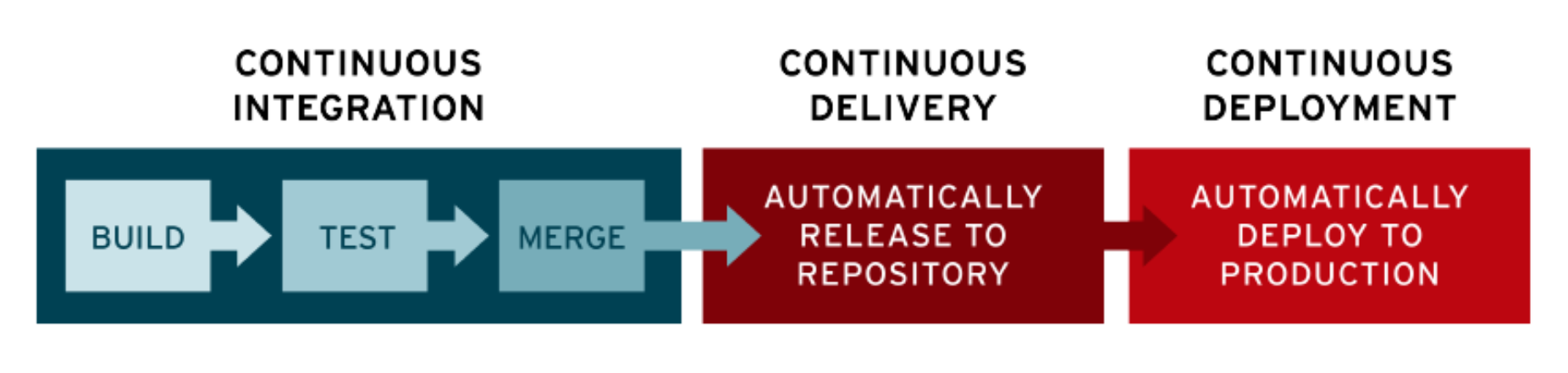
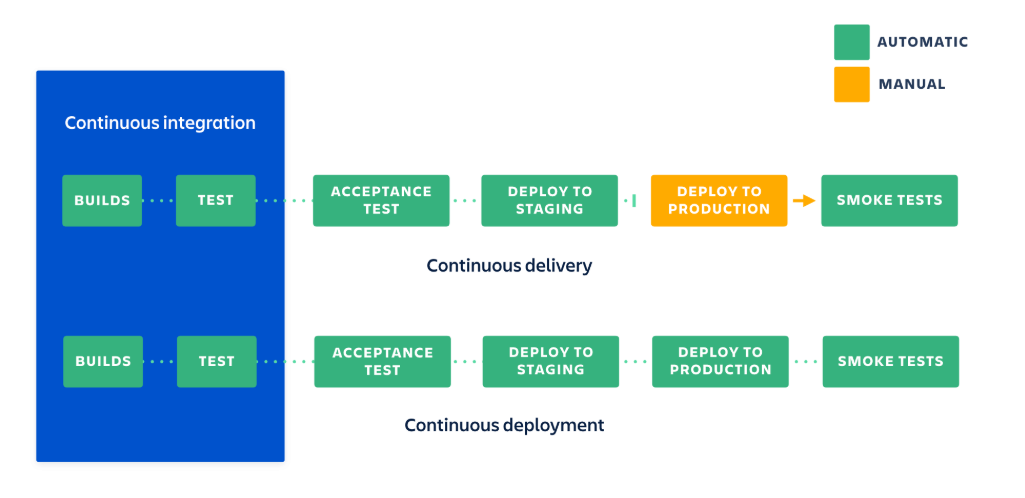
Together, these practices form a "CI/CD pipeline". This document explains the value of CI/CD and details its GitHub Actions implementation for Python projects using this template.
Usage Example
The following example demonstrates how to call the template workflow from your own projects:
permissions:
  contents: write
  pull-requests: write
  pages: write
  id-token: write

jobs:

  release:
    uses: jambazid/gha-actions/.github/workflows/python-uv.yaml@main
    secrets: inherit
    with:
      working-directory: python
      python-version: "3.11"
      low-pct-coverage-threshold: 70
      high-pct-coverage-threshold: 95
This configuration invokes the release pipeline against your Python package.
Tip
If your project involves private SSH dependencies, create a GitHub "repository secret" named UV_SSH_PRIVATE_KEYS. Add all private keys linked to the necessary repository "deploy keys".
Why Is CI/CD Important?
Note
CI/CD provides a continuous cycle of software development and updates that helps prevent bugs and code failures. By automating the manual steps required to deploy code, teams observe faster releases, minimized downtime, and more effective integration of user feedback. (Red Hat)
Key benefits include:
- Increased productivity
- Faster feedback cycles
- Accelerated, reliable releases
- Improved code quality
- Streamlined maintenance
Pipeline Steps
A standard CI/CD pipeline consists of the following stages:
| Stage | Description |
|---|---|
| Build (Integration + Delivery) | Executes tests, builds application code, and generates artifacts (binary distributions, documentation, test results). |
| Deploy | Releases a live instance of the application to the target environment. |
Note
This project's build pipeline handles both "integration" and "delivery".
Build
By utilizing a formal "build system", the build pipeline simplifies into a sequence of terminal commands:
- Format =
uv run ruff format - Lint =
uv run ruff check - Test =
uv run pytest - Test (with coverage) =
uv run coverage run -m pytest - Coverage (HTML) =
uv run coverage html - Build =
uv build - Publish =
uv publish
These commands can be ported to any CI/CD framework with config injected as environment variables. In this template, pipelines are orchestrated via GitHub Actions.
Deployment
Deployment configurations are highly specific to their target environments and are intentionally omitted from this template.
- Packaging Python code (CI) is universal. The outputs—such as "distributions", documentation, and test metrics—are largely independent of where they will run.
- Deploying code (CD) is environment-specific. The deployment methodology changes based on the platform:
- AWS Lambda (Serverless)
- Kubernetes (Kustomize, Helm)
- Infrastructure as Code (Terraform, CloudFormation, Azure Resource Manager)
- etc.
Local Automation
While CI/CD pipelines automate checks in the cloud, catching issues locally before pushing code saves time and reduces pipeline failures. This template provides several local automation tools to streamline development and enforce standards before code ever leaves your machine.
mise
mise manages the project's development environment. By defining requirements in mise.toml, it automatically provisions and versions tools like Python, uv, ruff, and other utilities. This guarantees that all developers use identical tooling versions without complex manual setup.
task
task is a modern task runner defined via Taskfile.yaml. It provides developers with simple, consistent shortcut commands to execute common project operations—such as formatting code or running tests — abstracting away the underlying terminal complexity.
prek
This template uses prek (a fast, drop-in replacement for pre-commit written in Go) to manage Git hooks. Configured via .pre-commit-config.yaml, prek automatically runs formatting, linting, and other automated checks against your staged files on every git commit. This feedback ensures that only standard-compliant code is pushed up to trigger GitHub Actions workflows.
GitHub Actions
CI/CD in this template is driven via GitHub Actions.
Workflows
Custom "workflows" are listed below.
| Workflow | Description | Template | Trigger |
|---|---|---|---|
| uv-release | End-to-end reusable template. | Y | Source code changes. |
| release | Specific invocation of -release for this project. |
N | Source code changes. |
| action-docs | Updates custom GitHub "Action" documentation. | Y | Custom "Action" changes. |
Workflows marked as templates are "reusable" and can be invoked from other repositories using the appropriate parameters.
Actions
Documentation on custom "actions" is linked to below.
| Action | Documentation |
|---|---|
| uv/lint | Usage |
| uv/zensical | Usage |
| uv/setup | Usage |
| uv/format | Usage |
| uv/test | Usage |
| action-docs | Usage |